Connect with your Pause ID
Share your Pause ID to connect with people inside Pause. Add them as Work or Personal without sharing a phone number.
Pause for iPhone
Pause helps you take control of work calls and messages, so you can be present in what matters most: your family, your time, your life.
A separate place for work communication, on your terms.
Your Pause ID. Your work connections stay in Pause.
A quick call can follow you home. A message can interrupt dinner. Pause gives work its own space, with hours that you choose.
No ringing on your device
Notification queued until you’re available
An illustration of Pause’s work-alert behaviour, not an app screen.
Availability on your terms
Pause lets you choose when work calls and messages can reach you — so being available for work does not mean being available all the time.
The moment your workday ends
One minute left.
You are inside the working hours you chose.
Website illustration of your Pause schedule changing at the end of your working hours.
Work communication that fits around your hours.
Share your Pause ID to connect with people inside Pause. Add them as Work or Personal without sharing a phone number.
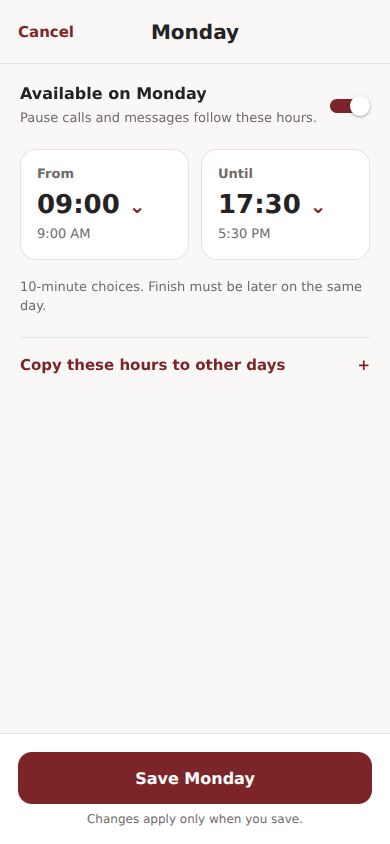
Set the hours that suit your routine, along with days off and annual leave, so Pause knows when work can reach you.

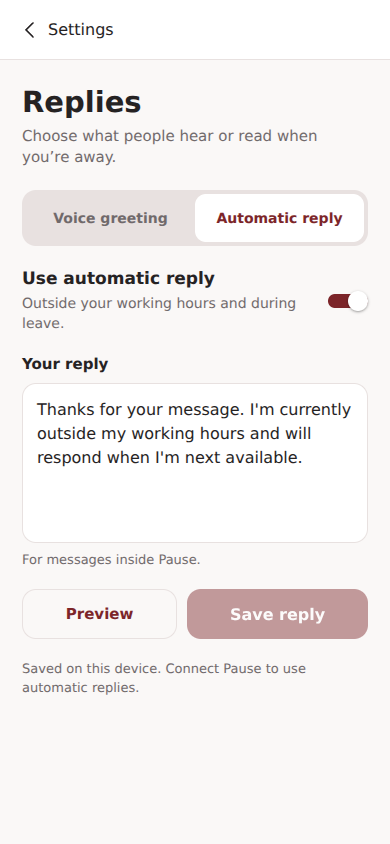
Set your automatic reply and voice greeting so people can read or hear the right message when you are away.

Everything you need to communicate with the people you work with, in a space that respects your time.
Speak to your contacts through Pause.
Keep work chats in their own space.
Talk face to face inside the app.
Share your screen during a call.
Choose when work can reach you.
Give each contact the right boundary.
A dedicated place for work communication.
A different purpose
Keep using the apps you enjoy for family, friends and everything else. Pause exists for one specific reason: to give work its own place — and let you decide when that place is open.
Pause uses end-to-end encryption for messages, shared media and call content, including video and screen sharing. Encryption protects what you say and share; account and delivery information are handled separately.
Privacy informationYes. Calls and messages happen between people using Pause. Add each other using your Pause IDs, then mark your connection as Work or Personal.
Through your unique Pause ID. Share it with the people you want to connect with, then decide whether each connection belongs in Work or Family & Personal.
Calls from your Pause Work contacts do not ring on your device, and their message notifications are queued until you are available again. Your work conversations are still there when you choose to open Pause.
Pause keeps work notifications quiet outside your hours. This is not the same as stopping people from sending you messages: you can choose when to open and read your work chats.
Contacts you mark Personal in Pause are not paused by your work schedule. Pause does not silence ordinary phone calls, SMS, email, WhatsApp or other apps; your phone’s own settings still apply.
Yes. Pause calls and messaging use an internet connection. Your usual internet or mobile-data charges may apply.
The first release is for iPhone. Android is planned for a later release.
Start with the hours you choose.